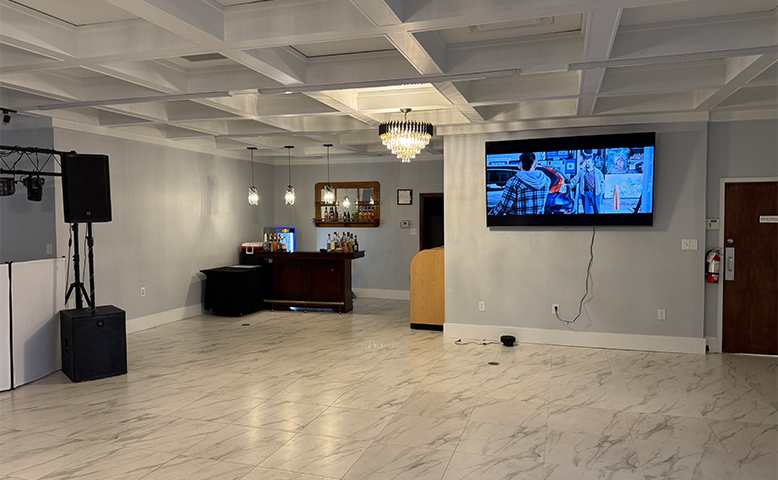
A professional event venue does more than hold people. It shapes how your meeting, training, launch, or gala feels and runs. Before you book, decide what success looks like: clear sound, smooth check-in, safe movement, and a schedule that stays on time. Build your shortlist with practical needs first, then style.
- Set your guest count range (minimum and maximum)
- List your “must-have” spaces like stage, breakout rooms, or expo area
- Note the key tech needs: microphones, screens, recording, streaming
With those basics in place, you can compare venues in a fair way and avoid surprises after you sign.
Location That Works for Guests
A venue can be beautiful and still cause stress if it’s hard to reach. Look at travel time from airports, hotels, and main roads. Many planners aim for a 30–45 minute transfer from the airport for business groups, when possible. Parking and drop-off also matter for speakers, VIPs, and deliveries.
- Check parking count and overflow options nearby
- Confirm ride-share pickup zones and bus access
- Review nearby hotel room inventory for your dates
After the map check, ask about wayfinding. Simple signs from the street to the lobby reduce late arrivals and keep your agenda steady.
Space Planning and Capacity Rules
Capacity isn’t only “how many fit.” It’s how many fit while staying comfortable and safe. As a rule of thumb, a seated banquet often needs about 10–12 square feet per guest, while theater seating may need around 6–8 square feet per guest, depending on aisles and staging. Breakout rooms need extra space for movement and late entry.
- Ask for a scaled floor plan with measurements
- Confirm ceiling height if you’re using staging or decor builds
- Check storage space for cases, swag, and signage
Then test your schedule against the layout. Long walks between rooms can eat up 5–10 minutes per session change.
Sound, Screens, and Sightlines
If guests can’t hear or see clearly, the room won’t feel professional. Ask about built-in speakers, microphone types, and acoustic treatment. Large rooms often need distributed speakers to avoid echo and volume spikes. For screens, check size and placement so the back row can read key text. A common guide is that the farthest viewer should be no more than 6–8 times the screen height away.
- Request an AV spec sheet, not just a brochure
- Ask if the venue supports hybrid events and recording
- Confirm how many wireless microphones are available
Finally, do a tech rehearsal. Even 30 minutes can uncover weak spots in sound or sightlines.
Reliable Wi-Fi and Tech Support
Wi-Fi is now part of the core utility package, like power. Ask what bandwidth is dedicated to events, not just the building total. For planning, a basic working range can be 2–5 Mbps per active device for email and web tools, and 5–10 Mbps for video calls or demos. If you expect 300 active users, that can mean hundreds of Mbps needed, depending on usage.
- Request a network map and access point count in your rooms
- Ask about wired options for streaming and keynote laptops
- Confirm on-site tech support hours during your event
After that, test the signal strength at the crowd level. A fast network at 9 a.m. can slow down when the room fills.
Power, Rigging, and Load Limits
Professional events rely on steady power for lights, screens, charging stations, and catering equipment. Ask how many circuits are in the main room and where the outlets are located. If you’re bringing production gear, confirm load limits and whether three-phase power is available. For hanging decor, lighting, or speakers, you’ll need rigging points and weight ratings.
- Get a power plan showing outlet locations and amperage
- Ask if cables can be taped down or routed under floor covers
- Confirm rules for truss, banners, and ceiling hangs
Then plan charging access. A simple guideline is one charging point for every 3–5 attendees for business events, especially for full-day programs.
Lighting and Climate Control
Lighting affects attention, photos, and video quality. You’ll want zones that can dim separately for stage, audience, and networking areas. Ask for lighting temperature options too, since many cameras handle 3200K and 5600K settings differently. Climate control matters just as much. A full room heats up fast, and strong stage lighting adds more heat. Good venues can adjust temperature by zone and react quickly.
- Check if lights can be preset for agenda moments
- Ask about HVAC control access during the event
- Confirm fresh air intake and airflow in packed rooms
After the tour, picture your busiest moment. If doors open and 200 people enter at once, the room should stay comfortable within 10–15 minutes.
Safety, Permits, and Accessibility
Safety is not optional, and it protects your guests and your brand. Ask about fire exits, occupancy permits, and emergency plans. Check if the venue has clear evacuation routes and posted exit signs. Accessibility is also essential for professional groups. In many regions, ADA-style access features are expected: ramps, elevators, accessible restrooms, and seating spaces for wheelchair users.
- Confirm step-free routes from the parking to the main room
- Ask about security options and bag check plans if needed
- Review insurance requirements and certificate details
Then look at crowd flow. Aisle width, door placement, and queue space can prevent congestion at check-in and breaks.
Service Flow and Back-of-House
Great events feel smooth because guests don’t see the work behind the scenes. Ask about loading docks, freight elevators, and set-up times. If vendors must share one small entry, your schedule can slip. Kitchens and prep areas matter for food quality and speed, especially for plated meals or timed breaks. For conferences, breakout refreshment points reduce lines.
- Confirm load-in hours and whether overnight storage is allowed
- Ask where trash, recycling, and empty boxes go during the event
- Check if there’s a green room for speakers and VIPs
After that, plan staffing. A common planning range is one registration staff member per 75–100 guests at peak arrival, depending on badge pickup and security steps.
Contracts, Costs, and Flexibility
A clear contract prevents stress later. Ask what’s included: tables, chairs, linens, staging, basic AV, security, cleaning, and tech support. Understand service charges, overtime rates, and minimum spend rules. Also, check the change terms. Many events shift by 5–15% in attendance as dates get closer, so flexible policies help.
- Request a full itemized estimate, not a single line price
- Ask about the deposit schedule and cancellation timelines
- Confirm what happens if sessions run late or you need extra hours
Before signing, review noise rules, outside vendor policies, and branding rules. The best deal is the one that stays stable when real planning begins.
Final Checklist Before You Book
Before you commit, score each venue against your needs: access, layout, sound, connectivity, safety, and service flow. Then confirm your top choice can support your specific agenda, not just “an event.” A short walkthrough with your AV lead and your coordinator can prevent most day-of problems.
- Do a final room count check against your peak attendance
- Schedule a tech run-through for screens, sound, and Wi-Fi
- Reconfirm load-in times, staffing, and cleaning plans
If you want a venue that handles these details with care and keeps your event running smoothly, book a tour and talk through your plan with Charlo Event Center.